10+ JavaScript Modal Windows
Enhance your UI with these JavaScript modal window examples. Whether you’re building custom dialogs, popups, or lightboxes, this collection showcases flexible, accessible modals crafted with pure JavaScript — ideal for confirmations, forms, or user notifications.
Examples

Tilt Grid Content Reveal
This is a Tilt Grid Content Reveal. It transforms a standard masonry image gallery into a highly interactive, spatial experience. Its function is to provide an engaging browsing interface where hovering induces physical 3D tilt, and clicking smoothly expands the thumbnail into a full-screen presentation, completely immersing the user in the selected content. (Requires: GSAP, charming.js, masonry.js, imagesloaded.js)
 Chrome 60+
 Edge 79+
 Firefox 55+
 Safari 11+
See the Pen Tilt Grid Content Reveal.
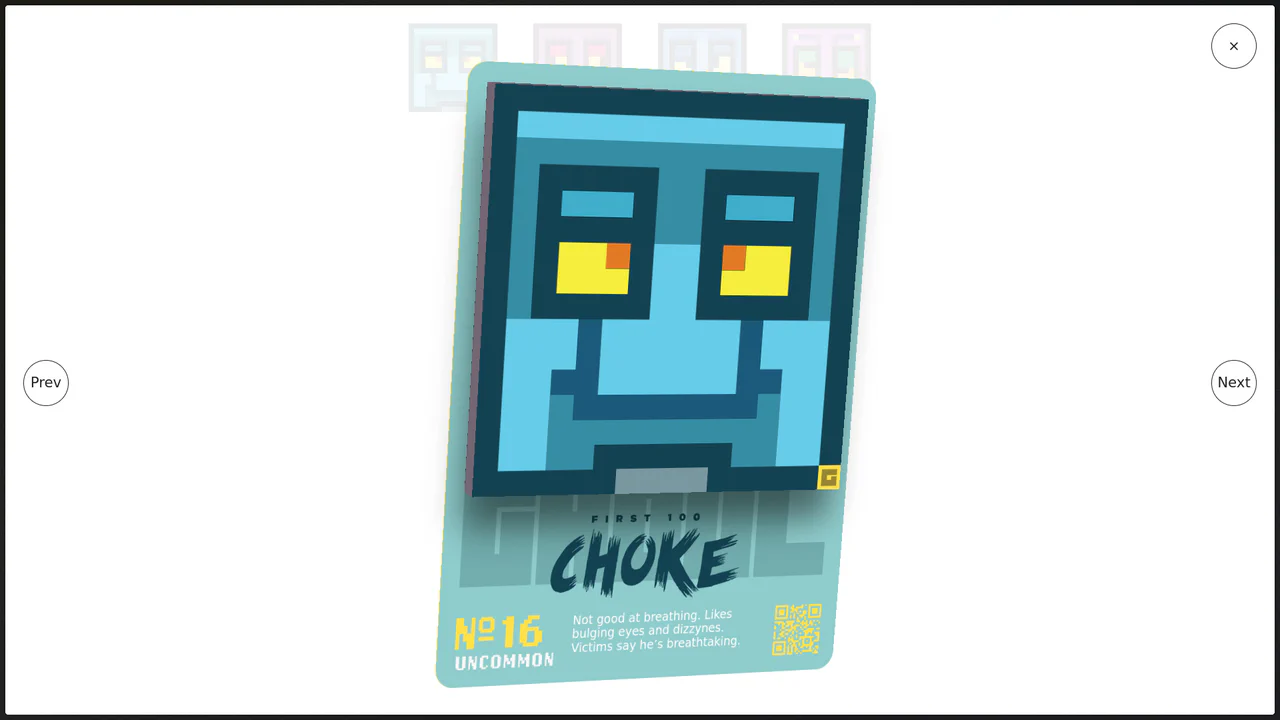
Immersive 3D Tilt Card Modal
We accept flatness in web interfaces as a constraint, but it is merely a habit. This component breaks the fourth wall, transforming a static modal into a tangible, digital artifact. By coupling mouse physics with deep perspective, we create an interaction that feels less like clicking a link and more like holding a rare collectable. (Requires: gsap)
Chrome 80+
Edge 80+
Firefox 75+
Safari 13+
See the Pen Immersive 3D Tilt Card Modal.

Playful Multi-Step Interaction
This Playful Multi-Step Interaction transforms a boring confirmation dialog into a delightful conversation. It guides the user through a short “chat” with a friendly avatar, using smooth animations and instant feedback. This pattern is perfect for onboarding flows, feedback forms, or any interface that benefits from a human touch, proving that standard interactions can be both functional and fun.
Chrome 75+
Edge 79+
Firefox 48+
Safari 13.1+
See the Pen Playful Multi-Step Interaction.

Modal v3
A dynamic modal interaction orchestrated by GSAP timelines, featuring a cascading entry sequence. Upon triggering, the button morphs into the modal container, followed by a staggered reveal of content, imagery, and the close control, utilizing back-easing for a playful, spring-like feel.
See the Pen Modal v3.

GSAP Timeline Modal Animation
A spectacular modal window animation built entirely on the GSAP Timeline. The sequence of element appearances, including a stagger effect for the content and smooth animation overlapping, is controlled with millisecond precision. The demo shows how custom ease functions add “life” and character to the animation.
See the Pen GSAP Timeline Modal Animation.

Draggable Modal with GSAP and Tailwind CSS
A practical example of using lifecycle callbacks in GSAP Draggable - onPressInit and onRelease toggle a CSS class on the body, triggering a smooth background animation for visual feedback during the interaction.
See the Pen Draggable Modal with GSAP and Tailwind CSS.

Responsive Modal Popup Box
A responsive share modal pop-up that appears from the bottom on mobile devices and centers on the screen on desktop. The display logic is entirely tied to toggling the .show-modal class using vanilla JS.
See the Pen Responsive Modal Popup Box.
Button-to-Modal Transition Animation with GSAP
Dynamic “button-to-modal” transition animation built with vanilla JavaScript and GSAP, featuring adaptive scaling calculation for correct display on all screen sizes.
See the Pen Button-to-Modal Transition Animation with GSAP.

Animated Upload Modal
A feature-rich file upload modal engineered with fluid CSS keyframe animations and a clean multi-state structure, driven by vanilla JavaScript to manage the ‘Ready’, ‘Uploading’, ‘Success’, and ‘Error’ flow via data-state attributes.
See the Pen Animated Upload Modal.

Leverage the modern View Transitions API to seamlessly morph any element (e.g., button to dialog) using the view-transition-name property and custom CSS keyframes like flip-in.